
Follow the below to access your MSSQL database through 'Remote Database Connectivity'->
Initially you should have installed the Microsoft SQL Server Management Studio software tool in your computer for accessing your database through the Remote Database Connectivity method.
Step 1: Open the Microsoft SQL Server Management Studio.
Step 2: Enter your Server Name as :- 72.29.72.36\MSSQLSERVER2008
Step 3: Enter your database username, password and now click 'Connect' button.
Step 4: Then you will find your database listed on the top left hand side of the screen.
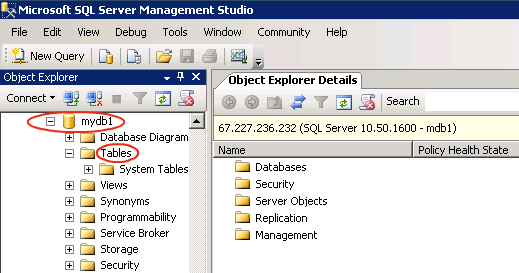
Step 5: Click on the database name and the database list will appear.
Step 6: Now you can access, create tables and views in the database list.
Step 7: Finally, log out from your account when you have completed your work.
